 Madmakker

Who this page is for: people living in Denmark who do not read Danish yet. The app is available in English, and so are all 212 recipes. The ingredient names are the ones printed on the packets in a Danish supermarket, so the shopping list works in the shop. Madmakker is not built for use outside Denmark.
What is Madmakker?
Madmakker is a free Danish meal planning app for Android that handles both the weekly plan and the shopping list for you. You enter how many people you are cooking for and roughly what the budget is. The plan and the list are ready straight away.
The app is made for the days when the endless question »what are we having for dinner?« drains the last of your energy. Instead of handing you yet another system to keep up with, Madmakker takes the pressure off: there is always a finished plan, and you can adjust it as you go.
Madmakker is made by Nixio, a passion project run by one person in Denmark rather than a company with a sales department. That is why the app costs nothing, and why there are no ads and no tracking.
In short: a weekly plan for lunch and dinner · a shopping list sorted to match your shop · 212 Danish everyday recipes · easy sharing with a partner or flatmate · defrosting reminders · all of it free, without an account and without needing to be online.
How it works
You set the size of the household and a weekly budget, tap refresh, and the week's meals appear along with a complete shopping list. The first step takes under a minute.
-
1
Set the household and the budget
Enter the number of adults and children and an approximate budget. You can always adjust it later.
-
2
Get the week's plan
Lunch and dinner for all seven days, with leftovers taken into account. Lock the days you like and swap the rest with one tap.
-
3
Get the shopping done quickly
The items are gathered automatically from the week's meals and sorted into categories that follow your route through the supermarket.
Features
Madmakker gives you a weekly plan, a shopping list sorted for your shop, 212 recipes with a focus mode and a timer, sharing between two phones without accounts, defrosting reminders, price estimates adjusted by the consumer price index from Statistics Denmark, and a widget showing tonight's dinner. On top of that comes an optional layer of points and 96 achievements, which can be switched off completely.
A weekly plan without decision fatigue
Lunch and dinner tailored to your household and your budget. Leftovers are reused sensibly, so you are not cooking from scratch every day. If a day's meal does not suit you, you swap it out in a moment.
A shopping list sorted for your shop
The ingredients are gathered automatically. Sort the aisle categories so the list follows your usual route through the shop, tick items off as you go, and subtract the things you already have in the cupboard.
The »can't face it« button
When there is nothing left in the tank, the app gives you one clear suggestion instead of a long menu. If you choose something ready-made or a takeaway, that is perfectly fine. The app does not judge you, and the meal still counts as dinner.
Share with the people you live with
Share the meal plan and the shopping list with your partner or flatmate using a simple code. You see the same plan and your ticked-off items stay in sync, with no user profiles and no passwords.
Focus recipes, one step at a time
212 familiar Danish everyday meals. Focus mode shows one step at a time together with a timer that is already set, so you do not get lost in a wall of text.
Realistic price estimates
The budget is based on estimates that are adjusted over time using the food consumer price index from Statistics Denmark, so the numbers do not fall behind. Prices are in Danish kroner.
Practical reminders
You get a message in the morning if the meat needs to come out of the freezer, and a friendly nudge when it is time to head to the kitchen. You choose the times yourself, or you turn it off entirely.
An optional game layer
Unlock 96 achievements and spend the points you earn on new themes and colours. Points cannot be bought with money, and the whole game layer can be switched off in the settings. Nothing is recorded in the background after that.
What it looks like
Screenshots from Madmakker on an Android phone. The interface shown is Danish.
-
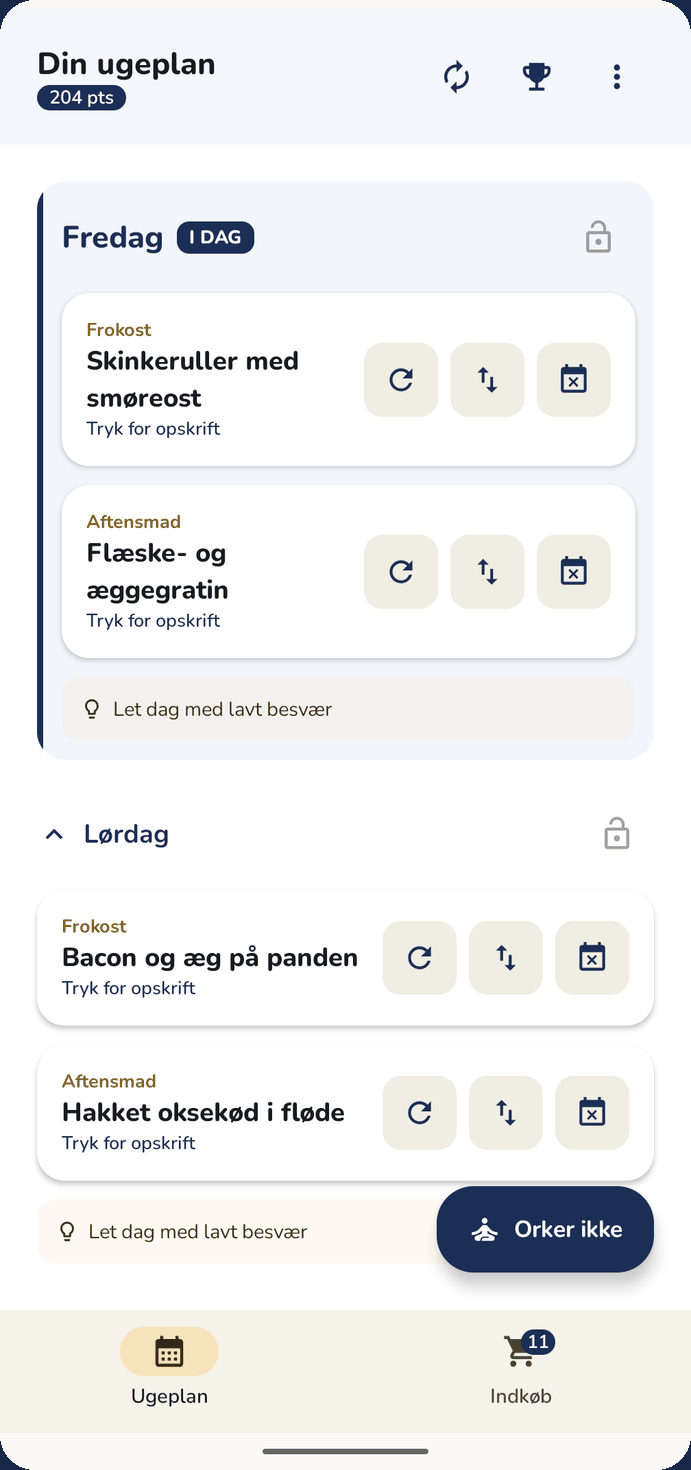
The weekly planToday's two meals at the top, the rest of the week below. -
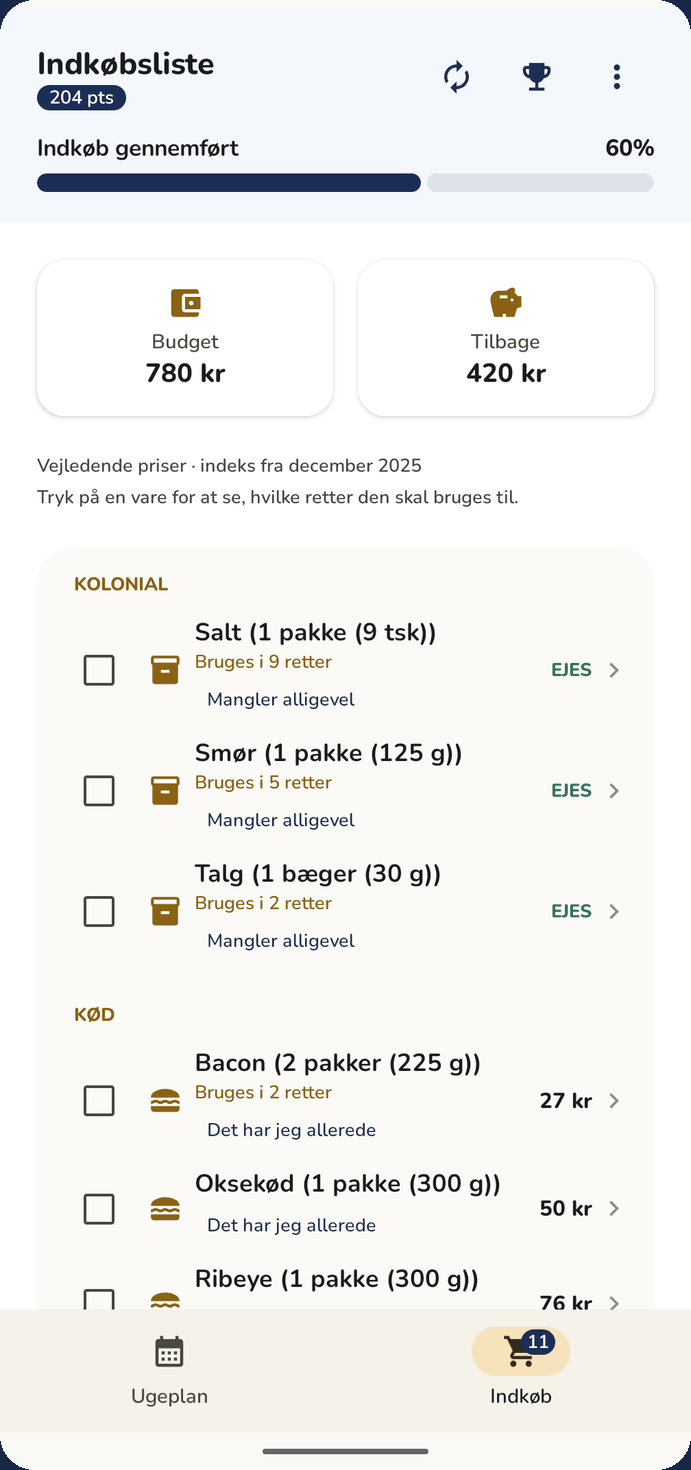
The shopping listGathered from the week's meals and sorted for your shop. -
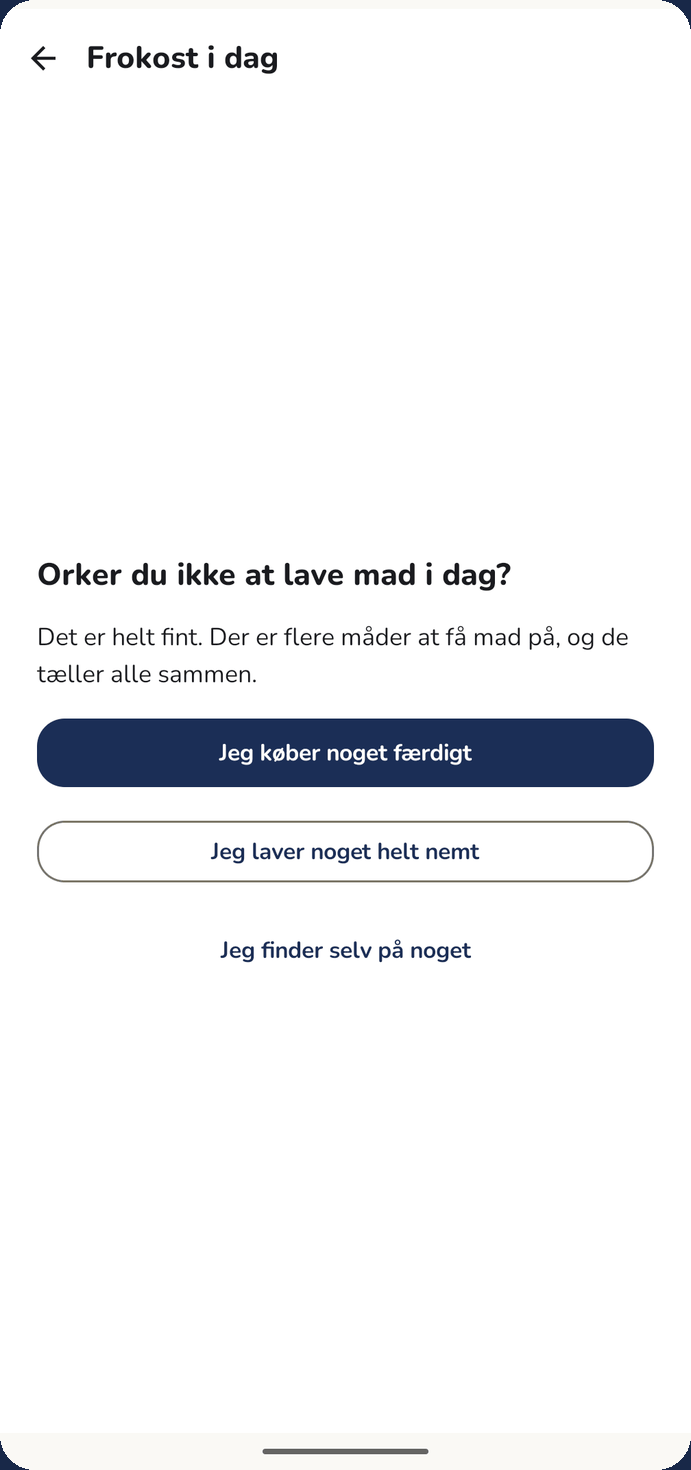
Can't face itThree ways forward, and not a word of reproach. -
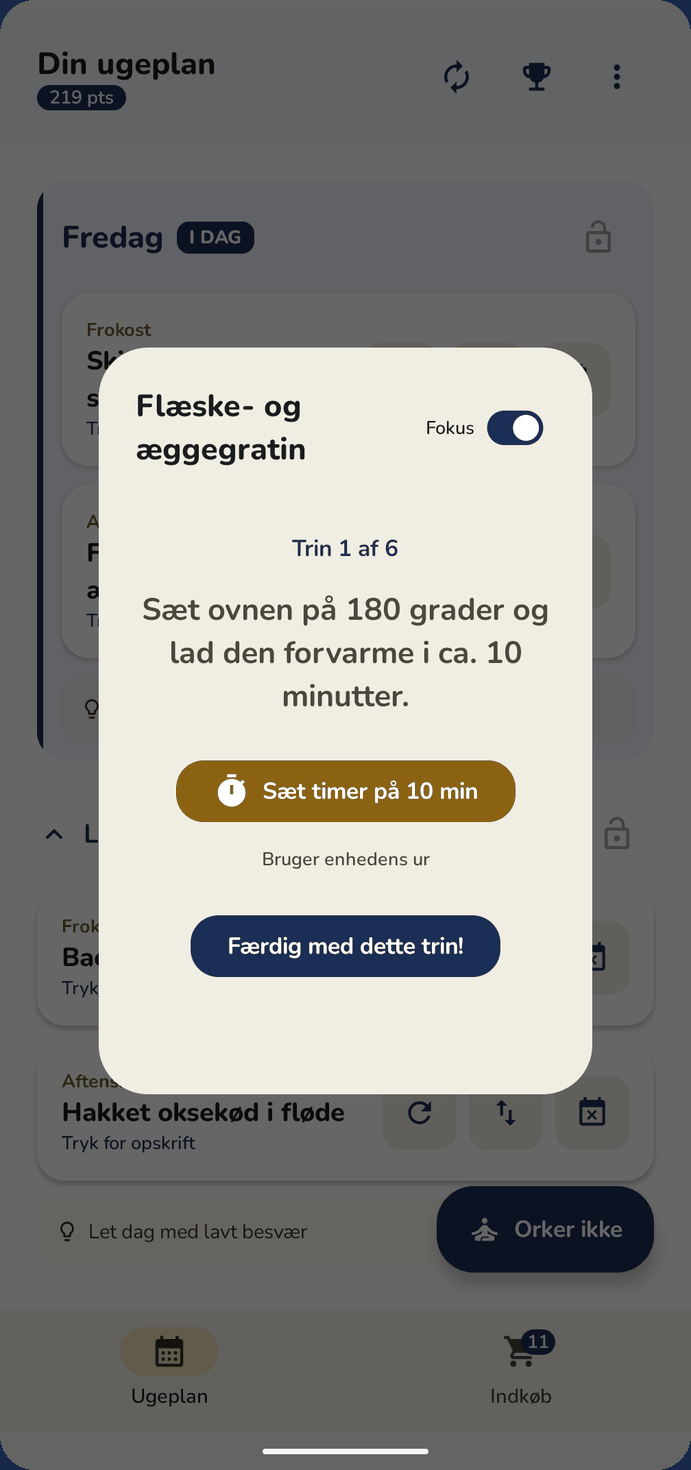
A recipe in focusOne step at a time, with a timer already set for you. -
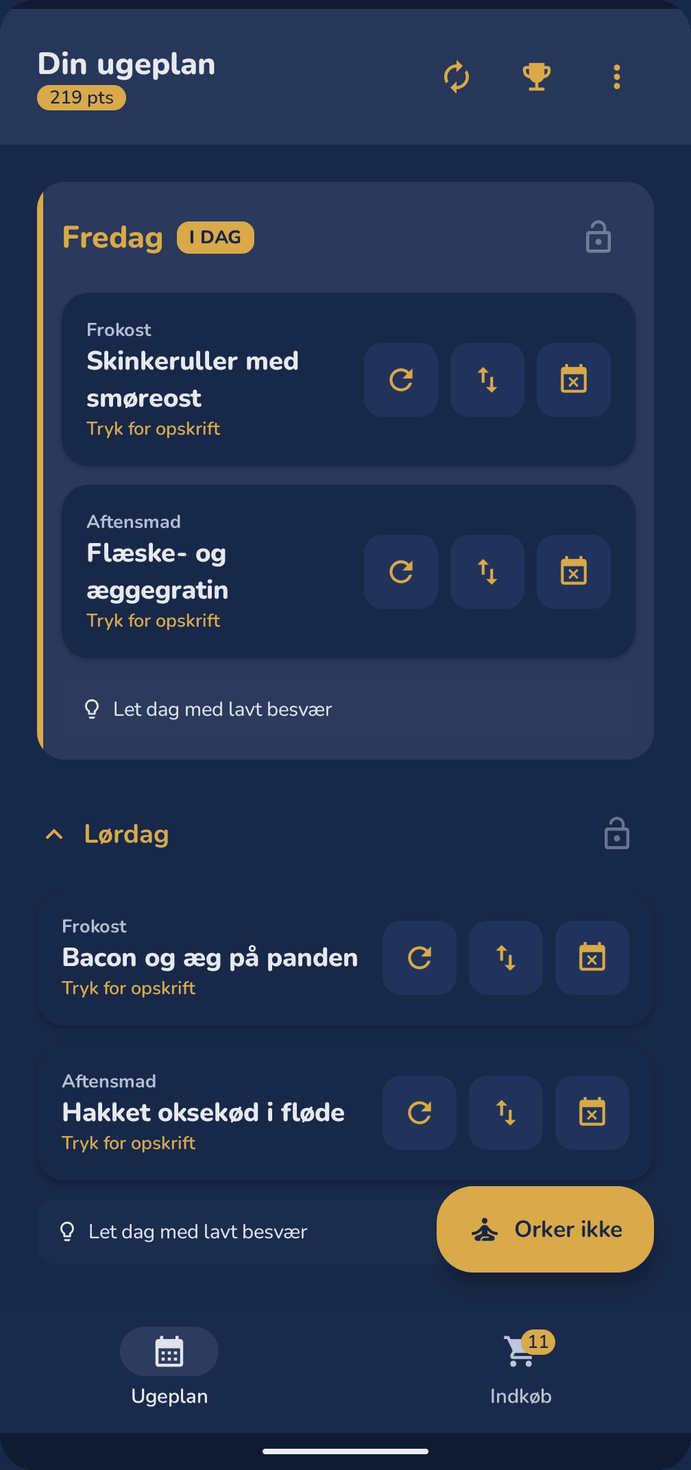
Dark themeThe whole app in dark colours. -
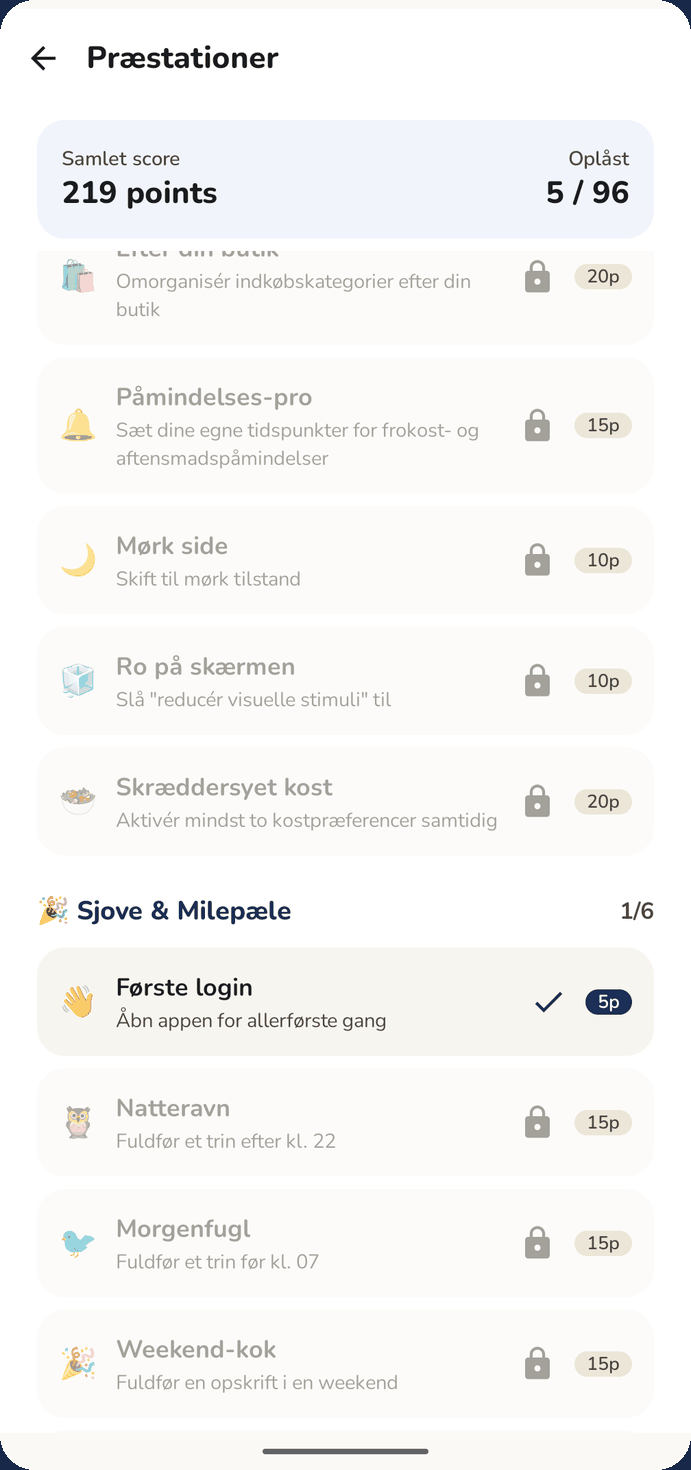
AchievementsAn optional layer that can be switched off.


Is Madmakker for you?
Madmakker is for you if you are not short of inspiration for elaborate food, but short of the energy it takes to choose. The app is built around everyday life with ADHD, but it requires neither a diagnosis nor any previous experience. It suits you if:
- It is half past five and you have run out of ideas for dinner.
- You have given up on meal plans in notebooks or spreadsheets after a single week.
- You end up in the supermarket every day because something is always missing.
- You order takeaway a little too often, simply because it is easier.
- You are tired of food apps full of ads, logins and monthly subscriptions.
- You live in Denmark and do your shopping in Danish supermarkets.
- You read enough Danish to follow a recipe, or you are happy to work through one with a translation app while you learn.
If, on the other hand, you love spending Sunday leafing through cookbooks and putting together ambitious menus from scratch, there are other apps that suit that better. See the comparison with the other Danish meal planning apps.
Your privacy is protected
Madmakker uses no user accounts, no ads, no analytics and no tracking. All of your data is stored on your own phone.
The app fetches only two things over the network. The first is the price index from the open API of Statistics Denmark, fetched at most once a week and without sending any information about you. The second is household sharing, if you choose to switch it on. It temporarily synchronises the meal plan and the shopping list through a secure server in the EU, based on nothing but a random code. No name, email, account or device ID goes with it, and when you stop sharing, the shared data is deleted.
The meal plan, the shopping list and the settings all work completely without an internet connection. If you uninstall the app, everything is gone. No profile, no hassle.
Read the full privacy policy on nixio.dk → (in Danish)
Facts about the app
| Name | Madmakker |
|---|---|
| Purpose | An automatic meal plan and a shopping list sorted by aisle |
| Platform | Android 7.0 and later. Not available for iPhone. |
| Price | Free. No subscriptions, no in-app purchases, no ads. |
| Language | Danish, English and German, with Danish ingredients and shop categories in all three. |
| Account | Not needed. The app is ready to use five seconds after you install it. |
| Offline | Yes. Everything except household sharing works without an internet connection. |
| Recipes | 212 built-in Danish everyday meals |
| Sharing | Synchronisation between two phones using a simple code |
| Currency | Danish kroner, adjusted by the food price index from Statistics Denmark |
| Version | 1.6.10, released 26 September 2026 |
| Achievements | 96, entirely optional. The layer can be switched off. |
| Publisher | Nixio, Denmark |
| Available from | Google Play |
| Support | kontakt@nixio.dk |
Frequently asked questions
What language is the app in?
Danish, English and German. The interface, all 212 recipes and the shopping list are translated, and the app follows your phone's language. From Android 13 you can set the language for Madmakker on its own, under Settings → Apps → Madmakker → Language. The ingredients keep the names printed on the packets in a Danish supermarket, because that is what makes the shopping list usable in the shop. All 212 recipes are on this website in English as well.
Is Madmakker free?
Yes. There are no trial periods, subscriptions, hidden paywalls or ads. You get every feature from the start, and there is no paid edition with the good features held back.
Is there a Madmakker+ or a premium edition?
No. There is no plus edition, no premium edition and no subscription. The whole app is free, and you get every feature from the start.
Is Madmakker available for iPhone?
No. Madmakker is currently available only for Android 7.0 and later through Google Play. There is no iPhone edition, and no date has been set for one.
Do I need to create an account?
No. You do not need an account or a password to use the app. You install it and start. Even sharing with the person you live with works through a simple code rather than a user profile.
Does the app work without an internet connection?
Yes. Meal plans, recipes and shopping lists are stored on your phone, so the app works in flight mode and in a basement with no signal. Only household sharing and the weekly price adjustment use the network.
Can we share the shopping list within the household?
Yes. One phone creates a short code, the other types it in, and from then on you both see the same weekly plan and the same shopping list, ticked-off items included. No accounts are involved, and the sharing can be stopped again.
Can I use my own recipes?
The app uses its 212 built-in meals to keep the process as simple and automatic as possible. You can swap a meal out, lock the days you are happy with, and add your own items to the shopping list freely, but you cannot write your own recipes into the app. Write to kontakt@nixio.dk if that is what you are missing.
I am new to Denmark. Will the recipes make sense to me?
That is exactly who the app is built for. The meals are ordinary Danish everyday cooking, the ingredient names are the ones printed on the packets in a Danish supermarket, the aisle categories match how the shops are laid out, and the prices are in kroner. Working through a week of it is a reasonable way to learn what is on the shelves. Madmakker is only meant for people shopping in Denmark; outside the country the ingredients and the prices will not match.
Why is the app built for ADHD?
Because meal planning rarely fails for lack of knowledge about food. It fails on the many small decisions that have to be made when the brain is empty. Madmakker is therefore built to ask fewer questions at a time, never to tell you off about a skipped day, and always to keep an easier way out available. The app is not a treatment, and it requires no diagnosis.
So what does a week of food cost?
That is up to you. You set a budget for the week, and the plan is built within it. The app shows a running price estimate on the list, so you can see where you stand before you reach the till. The estimates are estimates, not the shop's prices on the day.
Read more
These pages cover what people most often want to know: what to eat tonight, what a week of food costs, how you share the list, what the app does about diets, and how it stands against the other Danish meal planning apps.
What should we eat tonight?
Seven concrete meals for tonight, and five things that stop the question having to be answered again tomorrow.
What does a week of food cost?
Measured figures from the app's own planner: about 750 kr for one, 885 kr for two and 1,075 kr for a family of four.
A family meal plan
Why family plans fall apart during the week, and five things that keep them alive.
A printable meal plan template
An empty weekly planner with a shopping list, made to print from the browser. No sign-up.
Compare Danish meal planning apps
Madmakker against Valdemarsro, Nem Madplan, Madplan Online, Mambeno and madplan.ai, including when to choose one of the others.
A free meal planning app without a subscription
Why the app can be free, what you get without paying, and what the others cost.
Share the shopping list between two phones
How you connect with a short code, what is shared, and what is not.
Vegetarian, vegan, gluten-free
Diets and the exclusion of gluten, lactose and fish, and what they are not a guarantee of.
A meal plan when you live alone
Portions, leftovers and shopping when everything around you assumes there are four of you.
Meal planning with ADHD
Why meal plans fall apart, and nine things that usually make them hold.
Help and support
Getting started, household sharing, diets, reminders that do not arrive, and deleting your data.
All 212 recipes
The app's whole collection as ordinary web pages, in English: ingredients, steps with timings and nutrition per serving. Free to read without installing anything. The ingredient names are the ones on the packets in a Danish supermarket.
Get Madmakker
Madmakker is free, and you get the whole app straight away. There is no trial period.
Get it on Google Play Full access · Free · No ads
This page was last reviewed on 3 September 2026. If you have an idea, a bug or just a hello, write to kontakt@nixio.dk or use the feedback button inside the app.